
ChatGPT can assist with drafting emails, reports, announcements, and other communications.
Step 1: Drafting Emails
- Prepare the Instructions for ChatGPT:
Think about the email you need to write. What is the purpose of the email? Who is the audience? What key information needs to be included (dates, times, RSVP, etc.)?
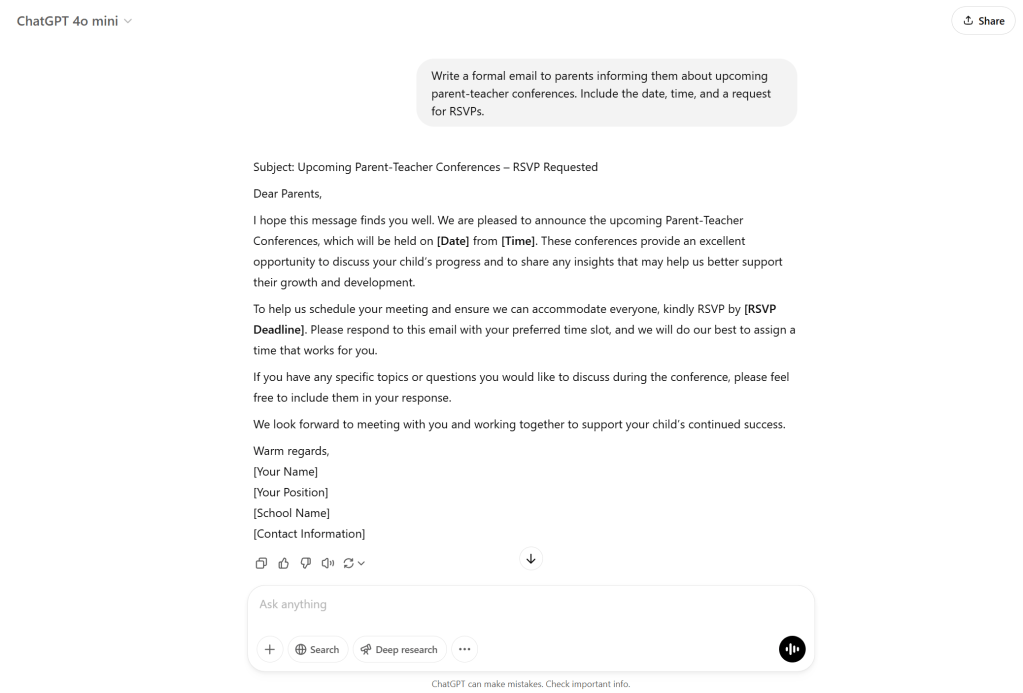
- Review and Send: Review the generated email draft for accuracy, add any necessary personal details, and send it to the intended recipients.
Step 2: Generating Reports
- Prepare Data or Information:
Collect all the data or points you want to include in your report (e.g., student survey results, meeting notes, or evaluation feedback). - Input Data to ChatGPT:
Provide ChatGPT with a summary of the data, including any specific sections you’d like in the report.- Example Input:
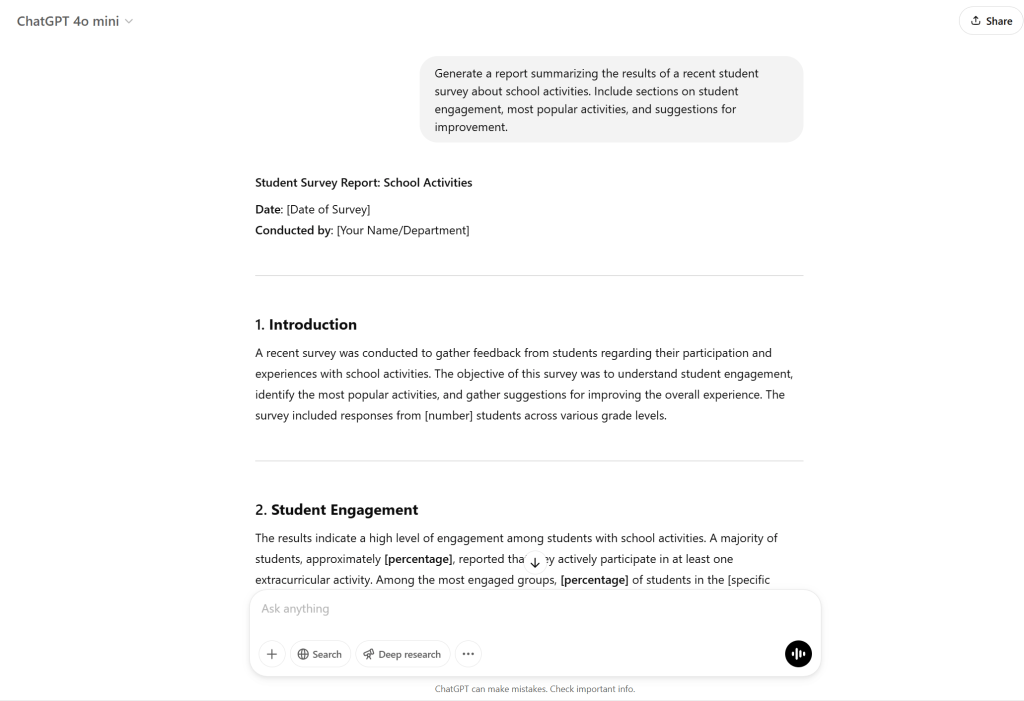
“Generate a report summarizing the results of a recent student survey about school activities. Include sections on student engagement, most popular activities, and suggestions for improvement.”
- Example Input:
- Generate the Report:
ChatGPT will create a professional report format with headings and summarized findings. - Review and Edit:
Review the report, make any edits if necessary, and share it with the intended audience.
Step 3: Creating Announcements
- Identify Key Details for the Announcement:
What is the announcement about (event, new policy, reminder)? Who is it directed to? What’s the important date/time or call to action? - Input to ChatGPT:
Give ChatGPT a brief description of the announcement details.- Example Input:
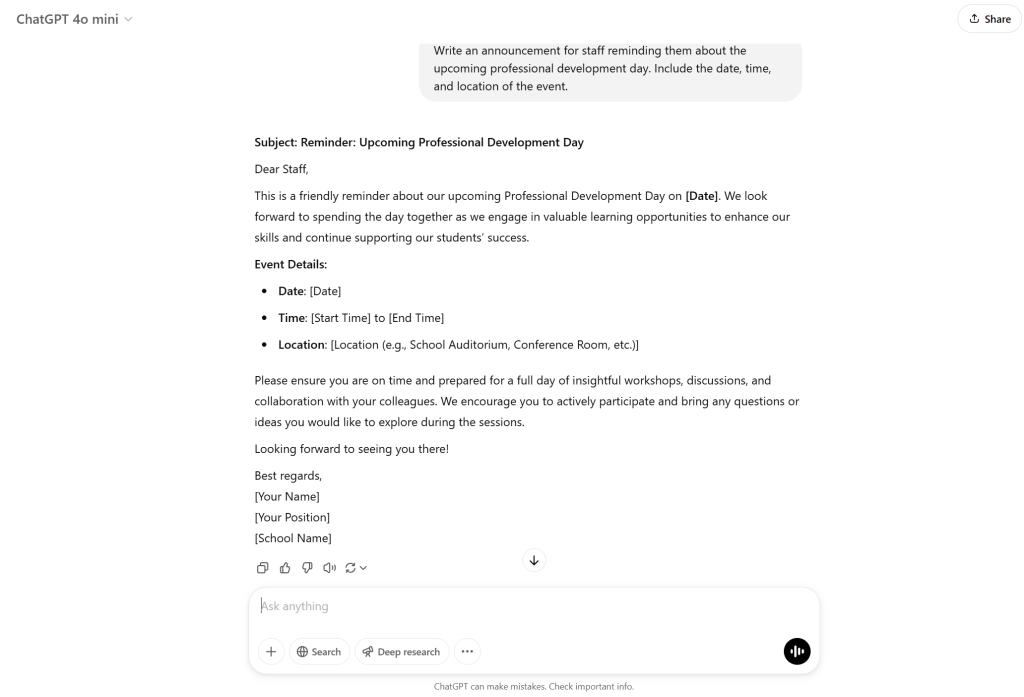
“Write an announcement for staff reminding them about the upcoming professional development day. Include the date, time, and location of the event.”
- Example Input:
- Generate the Announcement:
ChatGPT will provide a structured announcement. - Review and Distribute:
Review the announcement and send it out via your preferred communication platform (email, school website, etc.).
Answering Frequently Asked Questions
Step 1: Create a Knowledge Base
- Compile Common Questions:
Gather a list of frequently asked questions related to your school or organization. These could include school policies, event schedules, contact information, etc.- Example FAQs:
- What are the school’s attendance policies?
- When does the school year begin and end?
- How can I contact the principal?
- Example FAQs:
- Create Answers for ChatGPT:
Write a set of responses for each question to be used in the future.- Example Input:
“What are the school’s attendance policies?”
- Example Input:
- ChatGPT Response:
You can now input the FAQ question to ChatGPT, and it will provide an accurate response based on the knowledge base you’ve set up.- Example Output:
“Our school requires students to be present for at least 90% of school days to maintain academic standing. If a student is absent, a parent or guardian must notify the school within 24 hours. If absences exceed a certain threshold, parents will be contacted for a meeting to discuss potential solutions.”
- Example Output:
- Provide Instant Responses:
ChatGPT can be integrated as a chatbot or used manually to provide real-time responses to common inquiries from parents, students, and staff.
Step 2: Set Up ChatGPT to Answer FAQs Automatically
- Create an FAQ Database:
Use a document, spreadsheet, or website to house all of the FAQs and responses. This can be linked to ChatGPT for faster reference. - Use ChatGPT to Provide Instant Answers:
You can either:- Use ChatGPT interactively to answer questions manually or through a chatbot.
- Set up a chatbot (using a platform like Dialogflow or another chatbot tool) integrated with ChatGPT to automatically respond to FAQ queries from staff, students, or parents.
Step 3: Automate ChatGPT Integration
- Integrate ChatGPT with School Website or Portal:
For a more automated experience, integrate ChatGPT into your school’s website or internal portal. Create a chatbot interface that allows students, parents, or staff to ask common questions and get immediate answers. - Monitor and Update FAQs:
Regularly update the FAQ knowledge base with new information or common questions that arise, ensuring ChatGPT remains useful and accurate.
 NewEducations